|
|
The
e-Twinax Controller - Model 4612 |
|||||||||||||||||||||||||||||||||||||||||||||||||||||||||||||||||||||


|
|

The e-Twinax Controller is the only SNA-free, pure TCP/IP Controller in existence. It allows you to leverage your investment in Twinax by supporting all Twinax display stations and printers (both SCS and IPDS), as well as existing cabling. When used as a remote Controller, all SNA, AnyNet and MPTN traffic is eliminated, leaving your network with a single protocol: pure TCP/IP, which is easy to configure and maintain, and is routable. The e-Twinax Controller also supports remote management via a Web browser, saving you valuable technical resources
It's likely that the most popular use for this controller is to maintain legacy Twinax devices such as high-speed printers and dumb terminals at a remote site, when the traditional SDLC connection is replaced with a Wide Area Network (WAN) connection using TCP/IP. With the Controller, in this configuration all the devices will appear on the AS/400 as TN5250 devices. (Click here for more information on TN5250e)
All PC devices can connect to the AS/400 using dumb terminal emulation or load e-Twinax version of BOSaNOVA TCP/IP, V4.1, (also shipped with BOSaNOVA Plus V4.1) or IBM TCP/IP drivers, and connect to the AS/400 over TCP/IP. With the TCP/IP drivers loaded on the PC, the user can take full advantage of the WAN.
Users gain support for e-mail, can integrate with NT or Novell file servers, can share printers and files with others on the network, run Intranet applications, implement server-centric computing such as Citrix Metaframe, access the Internet, etc.
The e-Twinax Controller connects to the network using a standard network hub, which is attached to the local office via a standard IP Router. Ethernet PC's can be connected to the same network hub as the controller for mixed Ethernet & Twinax infrastructures.
Click here to receive additional Information on the e-Twinax Controller,
Advantages-
The e-Twinax Controller uses Pure TCP/IP - it replaces SNA connectivity and Anynet protocol with simple, easy-to-configure TN5250e TCP/IP
-
Serves as a secure, low cost connection from your remote branches to the iSeries AS/400 using any TCP/IP connection - LAN, WAN, Internet, VPN and even dial-up, saving a fortune in leased line expenses
-
Can use existing cabling infrastructure - actual Twinax Cabling or CAT5 with Active Star Hubs
-
Simple Remote Management of all remote controllers at all locations
-
An optional built-in 2- or 6-port Remote Access Server (RAS), complete with AS/400 client RAS software, built-in firewall, and support for RADIUS standards
-
Housed in a compact 1 U communications controller that fits into standard 19" rack-mount communications cabinets
The e-Twinax Controller is available in models that support up to 112 Twinax devices. If more are needed, you simply add another unit. Some models are upgradeable to 56 devices by simply entering a license code with no physical hardware change.
-
Allows configuration and management from a standard web browser that accesses the controller via dial up or over the WAN; most changes can be done without restarting the controller
Secure, Reliable, Low Cost Connection using the Internet
|
|
|
Secure connection via the Internet using modem(s) for a mixed Twinax and LAN environment. |
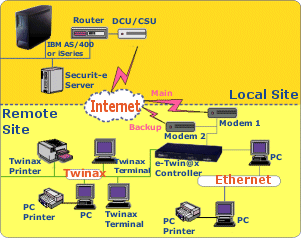
When the traditional SDLC connection is replaced with a Wide Area Network (WAN) connection using TCP/IP, the e-Twinax Controller can be used to maintain legacy Twinax devices (such as high-speed printers and dumb terminals) at your remote sites. In this configuration, all the devices will appear on the AS/400 as TN5250 devices, and all PC devices can connect to the AS/400 either by using dumb terminal emulation or by installing the e-Twinax version of BOSaNOVA TCP/IP or IBM TCP/IP drivers to connect to the AS/400 over TCP/IP.
The e-Twinax Controller can be connected to the AS/400 via the Internet, saving you a fortune in leased line expenses. Requirements are minimal:
- Local site: a fixed connection to the Internet and BOS' Java-based SECURIT-e ServerTM, which can be run on the AS/400, and any PC or Mini Computer with a Windows, Unix-based or Linux operating system.
- Remote site: a connection to the Internet, either via a dial up account or using a leased line to a local ISP.
5250 traffic, encrypted via industry-standard algorithms, flows from the Controller to the Java-based server, where the data is deciphered and sent to the AS/400. The e-Twinax Controller can initiate the dial-up to the Internet when the first user tries to access the AS/400. It also supports two parallel connections to two different ISPs, allowing increased bandwidth, speed and reliability.
Click here to receive additional Information on the e-Twinax Controller,
Configuration, Maintenance and Remote Management with Ease
The e-Twinax Controller is managed via a standard Web browser, enabling centralized management of all of the units from anywhere on the network, or via a modem dialed in to the RAS. Configuration can also be done using a dumb terminal attached to any of the ports. The controller software can also be updated, including expansion of supported devices and features functions, over the network or via dial-in. Terminals, PCs or printers can be added to the controller very simply using a plug-and-play feature in Auto mode. The device name can be changed at any time, without restarting the controller. The controller also verifies the host connection, including which PTFs are installed for each OS version.
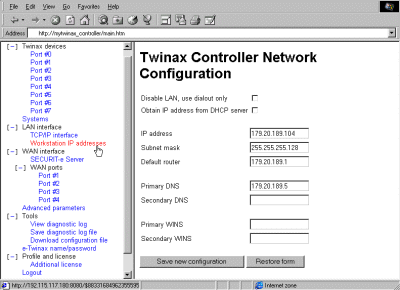
The e-Twinax Controller can be configured, and manage
all devices on the network, via a standard Web browser.
e-Twinax Controller as an IP/SNA Gateway
|
|
|
|
The e-Twinax Controller | |
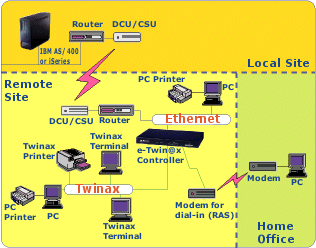
The connects to the network using a standard network hub, which is attached to the local office via a standard IP router. Ethernet PCs can be connected to the same network hub as the Controller for mixed Ethernet and Twinax infrastructures.
When the traditional SDLC connection is replaced with a Wide Area Network (WAN) connection using TCP/IP, the e-Twinax Controller can be used to maintain legacy Twinax devices (such as SCS and IPDS printers, and dumb terminals) at your remote sites. In this configuration, all the devices will appear on the AS/400 as TN5250 devices, and all PC devices with Twinax cards installed can connect to the AS/400 either by using dumb terminal emulation or by installing the e-Twinax version of BOS?OVA TCP/IP or IBM TCP/IP drivers to connect to the AS/400 over TCP/IP. With the TCP/IP drivers loaded on the PC, the user can take full advantage of the WAN, getting the following benefits:
- Support for e-Mail
- Printer and file sharing on the network
- Ability to access and run Intranet applications
- Implementation of server-centric computing such as Citrix Metaframe
The e-Twinax Controller connects to the network using a standard network hub, which is attached to the local office via a standard IP router. Ethernet PCs can be connected to the same network hub as the controller for mixed Ethernet and Twinax infrastructures.
Overcome Network Instability and Printing Problems
Dial Backup*
The Dial Backup feature ensures improved uptime for Controllers that are connected to an AS/400 using a LAN connection (via the Internet routers or a separate Frame Relay network). If the LAN connection fails, the Dial Backup provides (via an attached modem) an additional method to connect to the AS/400. Two configurations are available: Always, which provides a simultaneous connection at all times; and "On LAN Failure, which causes the Controller to activate the modem connection only when LAN connectivity failure is detected.
* Optional
Automatic Session Recovery
In the event that a router on a frame-relay network disconnects and then re-connects, users of remote Twinax-attached devices can choose to resume their current session. The e-Twinax Controller can be set to automatically recover the session, within a user-defined time period, ensuring smooth and efficient operations even in cases of network instability.
Customized Object for Specialty Printers
The e-Twinax Controller supports a wide variety of Twinax printers, including label and barcode printers that are often called upon to deal with special printing requirements such as oversized fonts, graphics, and unusual page sizes. A parameter can be set to instruct the host to send a pure data stream through the e-Twinax Controller, allowing it to override the original complex formatting commands with simplified commands that are supported by most printer models, before releasing the job to the destination printer.
Click here to receive additional Information on the e-Twinax Controller,
RJ45 Host Port Option (e-TwinStar) Eliminates Need for Active Star Hubs
 |
|
Rear
view of e-TwinST@r Controller |
The e-Twinax Controller now has an optional model that includes a built-in unit featuring 8 (or 16) RJ45 sockets. Twinax devices working over CAT5 lines are connected directly to the Controller, saving the cost of an active star hub and eliminating the need for power sources and additional space in the communications closet, as well as the extra set-up and maintenance time. The RJ45 Ports of this option operate just as a Twinax port with an RJ45 Balun attached to it.
If you need to connect more Twinax Devices than the number of physical ports on an e-Twinax Controller, please read the explanation in the next section. The e-Twinax Controller model must be able to support the number of devices you need to connect.
The e-TwinStar (4800 Series) is available in models with support for 8, 16, 28, 56 or 112 Twinax addresses/devices. The 4800 Series is fully upgradeable from one model to the next allowing for growth from 8 to a full 112 device support.
Upgrades are made by simple entering a new software key in the configuration section of the e-Twinax. You can upgrade remote locations by accessing the upgrade portion of the configuration over your WAN. Upgrading is done while the controller is in full operation. There is no need to have those users connected to it brought down. This eliminates the need other controllers have to bring them down while increasing their device capacity or adding options.
Explanation of Device Support
for the Twinax and RJ45 Ports of e-Twinax Controller
As with the standard AS/400 8-port "Twinax Brick" from the Twinax Workstation Controller, each Host Port (Twinax or RJ45) of the e-Twinax will support up to a maximum number of 7 device addresses (0, 1, 2, 3, 4, 5, 6), up to the maximum number of devices the particular model controller will support. This convention holds true to all Twinax or RJ45 Host Ports of S/36, S/38, AS/400, iSeries and all IBM, Decision Data, I-O, Idea, and Perle Remote Controllers except for the very old 5251-12 and 5294 controllers that only supported a maximum of 4 addresses per Host Port.
For example, an IBM 5394-01B Controller has three Twinax Host Ports. Three ports with 7 devices each would total 21. The 5394-01B only supports 16. You can distribute those 16 device addresses across those three ports however you see fit. That could be 7 on the first port, 7 on the second port and 2 on the third port. You could also have 6, 6 and 4 or any other combination that totals 16 device addresses with a maximum of 7 on any one port.
Another example is the 4616 (Twinax Host Ports) and 4816 (RJ45 Host Ports) of the e-Twinax Controllers. Both of these models will support 16 Twinax addresses/devices but only have 8 physical ports. Using the same logic as with the 5394-01B example, you can connect devices to ANY of these 8 ports as long as the total number of addresses used is 16 or less. For example you could use the same 7, 7, and 2 on the first three Host Ports as with the 5394. Being these models have 8 Host Ports, you could also put 2 devices on each port for a total of 16. You could also have 4, 4, 4 and 4 on four of the 8 Host Ports or any other combination that totals 16 device addresses with a maximum of 7 on any one of the 8 ports.
If you need to connect more physical devices than the number of ports you have two options.
First, you can "cable-through" your Twinax devices from one to the next using actual Twinax cables. Using this method you can connect up to 7 devices to a single Host Port. If you are using multiple session terminals, the number of physical devices would be less as each Host Port will only support 7 addresses.
Second, you can add a Twinax-to-RJ45 Active Star Hub such as the Gemini Express Active Star Hub to your setup. These Active Star Hubs connect to one of the controllers Host Ports either by Twinax Cable or Category 5 (CAT5) cable, and expand the single port to 7 RJ45 ports corresponding with the device addresses available on that port of 0, 1, 2, 3, 4, 5, and 6. This is the same whether the e-Twinax Controller has Twinax Host Ports or RJ45 Host Ports. In this implementation each Twinax Device would be required to have a Twinax-to-RJ45 Balun on it to allow connection with a CAT5 cable.
The RJ45 Host Ports of the e-Twinax Controller are operationally the same as a Twinax Host Port with an RJ45 Balun attached to it.
E-mail on Dumb Twinax Terminals*
Basic e-mail functionality, known as TwinMailTM, is supported on dumb Twinax terminals. In addition to sending and receiving e-mail, TwinMail includes a personal address book that can be organized according to user-defined preferences.
* Optional
PC Remote Access
The e-Twinax Controller can be configured with an optional 2- or 6- port Remote Access Server (RAS), providing remote PC users with network access in addition to AS/400 access. Remote users can dial in to the e-Twinax Controller and gain access to the network using the RAS. This RAS includes a firewall for restricting access per user to specific IP devices or ports (e.g. one group of users may be allowed to access the AS/400 for display emulation, but not file transfer). The RAS also automatically logs all remote access activity. The RAS component can use the services of any RADIUS server for authentication, if required.
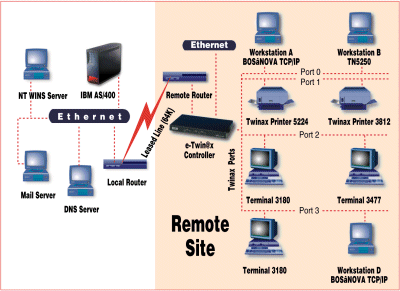
e-Twinax Controller in Remote Configuration, Using Leased Line Connection via Routers
Click here to receive additional Information on the e-Twinax Controller,
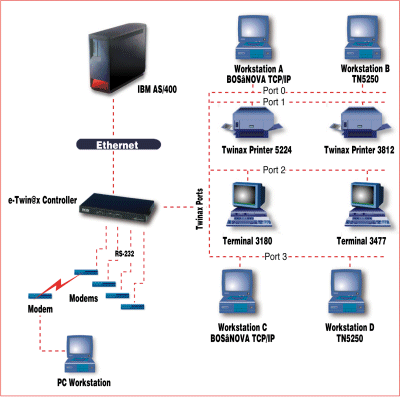
Sample e-Twinax Controller Configuration for Local Environment, including RAS
Click here to receive additional Information on the e-Twinax Controller,
Support for APPC Connectivity
Since the e-Twinax Controller is an IP device that communicates with the AS/400 over a LAN connection, APPC can be supported using Anynet. The PC Twinax user simply installs the IP driver, then reconfigures the APPC software to connect over TCP/IP. For PCs using Client/Server software that requires E32APPC (the IBM-defined standard for router interfaces) the router must be configured to use Anynet. This procedure will restore the APPC connectivity option. (Click here for additional APPC Connectivity information)
Secure Low Cost Connection Using the Internet
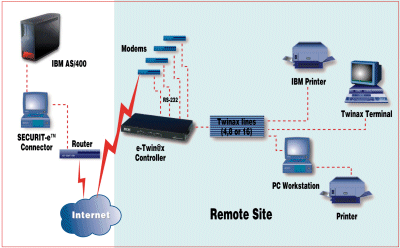
The e-Twinax Controller can be connected to the AS/400 via the Internet, saving you a fortune in leased line expenses. The requirements are minimal: at the local site you need a fixed connection to the Internet and BOS’ Java SECURIT-e ServerTM, which can be run on the AS/400, and any PC or MiniComputer with a Windows-, Linux- or Unix-based operating system. At the remote site you need a connection to the Internet, either via a dial up account or using a leased line to a local ISP. 5250 traffic, encrypted via industry-standard algorithms, flows from the controller to the Java-based server, then the data is deciphered and sent to the AS/400. Using this connection method the customer can save thousands of dollars a year on long-distance leased line costs. The e-Twinax Controller can initiate the dial-up to the Internet when the first user tries to access the AS/400. It also supports numerous, simultaneous connections to multiple ISPs, allowing increased bandwidth as well as a built-in fallback when required.
e-Twinax Controller as a Secure Connection to the AS/400 over the Internet
Technical Specifications
4612 eTwinax Controller Technical Specifications |
|
| Devices Supported | |
| Ports | 16 Twinax Ports - Each will support up to a maximum of 7 device addresses (0, 1, 2, 3, 4, 5, 6 ,7 ,8) up to a maximum of 112 devices/addresses across all 8 ports. |
| Displays | Partial List - 5251, 5291, 3179-2, 3180, 3196, 3197C, 3197D, 3476, 3477, 3486, 3487, 3488 and compatibles by Decision Data, CLI, I-O, Memorex-Telex, etc. (not all features are supported such as shared addressing, mouse support, imaging, etc. |
| Printers | SCS Printers - IBM 3812-1, 4214, 5219, 5224, 5225, 5256, 5262, 6262, 6400 and compatibles |
| IPDS Printers - IBM 3812-2, 4224, 4230, 4234, 4028 and compatibles | |
| Other Printers - Most printers and printing devices such as thermal printers, card printers, etc. with built in Twinax interfaces or external Twinax interface protocol converters | |
| Workstations/PCs | Supports all PCs with Twinax 5250 emulation (TDLC) and BOS, IBM or IBM-compatible Emulation Cards |
| Host System Requirements | |
| AS/400 Operating System | OS/400 V3R2 or higher |
| AS/400 Internal Features | AS/400 Ethernet LAN Connection |
|
PTF Levels |
Click here for the PTFs needed for full operation |
Ordering Information
| ITEM NUMBER | DESCRIPTION -4600 Series e-Twinax Controllers - Twinax Ports |
| 4691 | eTwinPrint - supports 1 device |
| 4693 | Model 4693 eTwinax - supports to 3 devices |
| 4610 | Model 4610 eTwinax - supports up to 10 devices (replaced with 4614) |
| 4614 | Model 4614 eTwinax - supports up to 14 devices (not upgradeable) |
| 4616 | Model 4616 eTwinax - supports up to 16 devices, 8 Twinax ports |
| 4628 | Model 4628 eTwinax - supports up to 28 devices, 8 Twinax ports |
| 4656 | Model 4656 eTwinax - supports up to 56 devices, 8 Twinax ports |
| 4612 | Model 4612 eTwinax - supports up to 112 devices, 16 Twinax ports |
| ITEM NUMBER | DESCRIPTION -4800 Series e-Twinax Controllers - RJ45 Ports (eTwinStar) |
| 4808 | Model 4808 eTwinax - supports up to 8 device, 8 RJ45 ports |
| 4816 | Model 4816 eTwinax - supports up to 16 devices. 8 RJ45 ports |
| 4828 | Model 4828 eTwinax - supports up to 28 devices, 16 RJ45 ports |
| 4856 | Model 4856 eTwinax - supports up to 56 devices, 8 RJ45 ports |
| 4812 | Model 4812 eTwinax - supports up to 112 devices, 16 RJ45 ports |
Click here to receive additional Information on the e-Twinax Controller,
APPC
Since the e-Twinax
Controller is an IP device, communicating with the AS/400 using a LAN connection, APPC can
be supported using Anynet. The PC Twinax user will simply install the IP driver, in order
to give access to e-mail, Internet, etc., then reconfigure the APPC software to connect
over TCP/IP. In most cases this will be enough, however, if the PC is using Client/Server
software, which requires E32APPC (the IBM-defined standard for router interfaces), then
the router itself must be configured to use Anynet. This will grant all the same APPC
connectivity as before. VPN (Secure, low-cost connection using the Internet) The e-Twinax controller can be connected to the AS/400 via the
Internet. This method of connection can save the customer a fortune in leased line
expenses. What is needed at the local site is a fixed connection to the Internet and a
Java server (supplied by BOS), which can be run on the AS/400, and any PC or MiniComputer
with a Windows-, Linux- or Unix-based operating system. At the remote site we require a
connection to the Internet, either through a dial up account or using a leased line to the
local ISP. RC4 encrypted 5250 traffic flows from the controller to the Java-based server,
the data is then de-encrypted and sent to the AS/400.Using this method of connection the
customer can save thousands of dollars a year
on long-distance leased line costs.
[Back to "Support for APPC Connectivity"]
TN5250e
Why use TN5250e for devices? TN5250e is the fastest way to communicate with the AS/400, because it requires no routers, no APPC encapsulation, and no additional configuration beyond simple TCP/IP configuration. Since TN5250e supports device naming and SCS printing, there is no real disadvantage in using this type of connection. IBM, BOS and many software companies also support ODBC, SQL file transfer, and IFS (shared folders) over TCP/IP. With IBM's Operations Navigator given free of charge with latter OS/400 versions, the AS/400 can be configured as part of Microsoft Networking. This allows the AS/400 drives to be shared, as well as any AS/400 printer, with any PC's on the TCP/IP network.
Click here to receive additional Information on the e-Twinax Controller,
You can receive a Microsoft Power Point Presentation on this product by clicking here.
Please call us at 800-597-2525 or 1-908-855-8100 to discuss your application or if you have any questions.